понедельник, 1 февраля 2016 г.

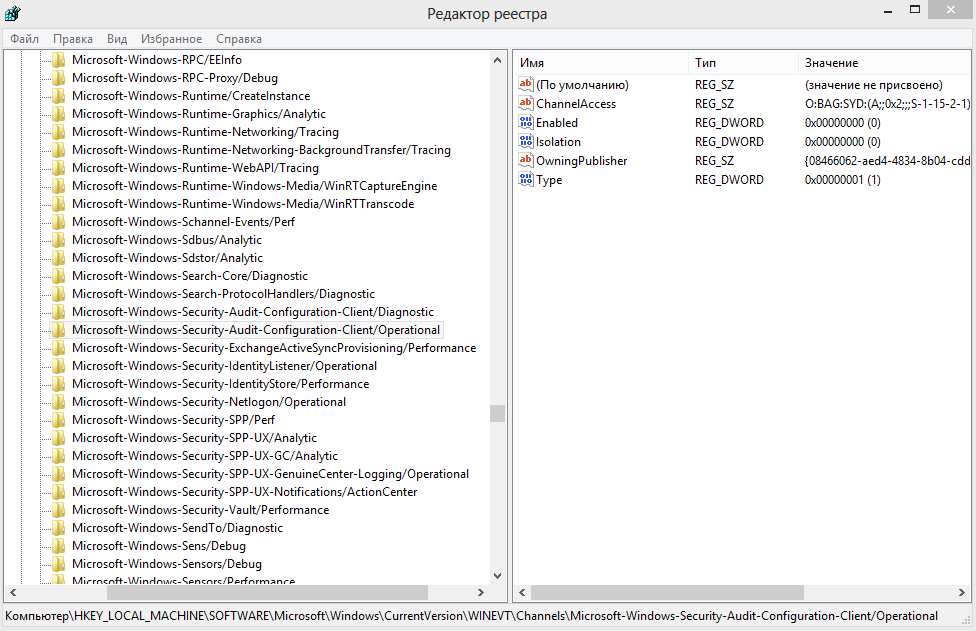
WER-Diag tweak


[HKEY_LOCAL_MACHINE\SOFTWARE\Microsoft\Windows\CurrentVersion\WINEVT\Channels\Microsoft-Windows-WER-Diag/Operational]
"Enabled"=dword:00000000

Look at logs windows\sistem32\winevt to remove other errors 

вторник, 26 января 2016 г.

ReadyBoot tweak

http://www.photosbytom.com/ftopict-89.html

Error:

Kernel-Event Tracing:

 The maximum file size for session "ReadyBoot" has been reached. As a result, events might be lost (not logged) to file "C:\Windows\Prefetch\ReadyBoot\ReadyBoot.etl". The maximum files size is currently set to 20971520 bytes.


Solution 1: found on MS Social from user voxmuta is as follows:

http://social.technet.microsoft.com/Forums/en-US/w7itprogeneral/thread/ad58fb17-ee50-4353-9967-f70b24e2d87f/
Quote:
Hey guys, the solution is simple - just increase the max file size! Go to:


 HKEY_LOCAL_MACHINE\SYSTEM\CurrentControlSet\Control\WMI\Autologger\ReadyBoot


 The MaxFileSize key is a DWORD with a default decimal value of 20. Increase this to, say 60, and the problem will go away.


 Luck to ya!

p.s. there are variants to set enabled to 0 and service to start 4

суббота, 9 января 2016 г.

dcom settings

The ACLs are stored in the registry under the key HKEY_LOCAL_MACHINE\SOFTWARE\Microsoft\Ole, in the following binary values:

    DefaultAccessPermission
    DefaultLaunchPermission
    MachineAccessRestriction
    MachineLaunchRestriction

To reset them, all you need to do is to delete these values. If DCOM doesn’t find any ACLs here, then it will use its defaults. Any changes you make will then re-create the values. Of course, you’ll want to back them up before you delete them, or you could just rename them to be safe.

adminarsenal.com

disable activex ie

Windows Registry Editor Version 5.00
[HKEY_LOCAL_MACHINE\SOFTWARE\Microsoft\Internet Explorer\ActiveX Compatibility\{D27CDB6E-AE6D-11CF-96B8-444553540000}]
"Compatibility Flags"=dword:00000400


Windows Registry Editor Version 5.00[HKEY_LOCAL_MACHINE\SOFTWARE\Microsoft\Internet Explorer\ActiveX Compatibility\{D27CDB6E-AE6D-11CF-96B8-444553540000}]
"Compatibility Flags"=dword:00000400[HKEY_LOCAL_MACHINE\SOFTWARE\Wow6432Node\Microsoft\Internet Explorer\ActiveX Compatibility\{D27CDB6E-AE6D-11CF-96B8-444553540000}]
"Compatibility Flags"=dword:00000400


adminarsenal.com

четверг, 7 января 2016 г.

autotuninglevel tcp

  • Open a command prompt and execute the following command:
netsh int tcp set global autotuninglevel=disabled
The default level is "normal." The possible settings include:
  • disabled: uses a fixed value for the tcp receive window. Limits it to 64KB (limited at 65535).
  • highlyrestricted: allows the receive window to grow beyond its default value, very conservatively
  • restricted: somewhat restricted growth of the tcp receive window beyond its default value
  • normal: default value, allows the receive window to grow to accommodate most conditions
  • experimental: allows the receive window to grow to accommodate extreme scenarios (not recommended as it can degrade performance in common scenarios; only intended for research purposes. It enables RWIN values of over 16 MB)
http://kb.globalscape.com/KnowledgebaseArticle10438.aspx 

четверг, 31 декабря 2015 г.

Networking Restrictions to improve security

Networking Restrictions
http://hardenwindows8forsecurity.com/Harden%20Windows%208.1%2064bit%20Home.html

Updated 1/31/00

There are general restrictions you can make in Networking

Start Regedit
Go to HKEY_Current_User / Software / Microsoft / Windows / CurrentVersion / Policies
Create a new key under Policies called Network
You can then add DWORD values set to 1 in the appropriate keys
To re-enable them, either delete the key or set the value to 0
DisablePwdCaching = Password Caching
HideSharePwds [hex] =Shared Passwords
NoEntireNetwork =Entire Network
NoNetSetup =Network applet
NoNetSetupIDPage =Network Identification tab
NoNetSetupSecurityPage =Network Access tab
NoFileSharing =Network File Sharing button
MinPwdLen = set Minimum Password Length (integer number: 0 - 99)
NoPrintSharing =Network Print Sharing button
NoWorkgroupContents =Network Workgroup